
Alesis MultiMix 4 USB Mixer in 2026: What This 2013 Podcast Setup Still Gets Right
Originally published November 24, 2013. Updated for 2026.
Original review by Brad Chaffee. 2026 editorial update by Jim Collison.
2026 Editor’s Update
When Brad Chaffee reviewed the Alesis MultiMix 4 USB for TheAverageGuy.tv in 2013, podcast production looked different than it does today.
Brad was trying to solve problems that will sound familiar to anyone who has produced a podcast: microphone gain, background noise, bringing in a remote co-host, playing intro music and sound bites, working with prerecorded interviews, and reducing the amount of time required after the recording was finished.
The MultiMix 4 helped him do that.
More than a decade later, those problems haven’t disappeared. What has changed is how many of them can now be solved inside one piece of hardware or software.
My own studio evolved separately from Brad’s MultiMix 4. I later used an Alesis MultiMix 8 USB FX, experimented with a PreSonus AudioBox and VoiceMeeter, and then moved to a Mackie PROFX8.
Looking back at Brad’s review in 2026, I think the interesting question isn’t whether this particular old mixer can compete with modern podcast hardware.
It’s this:
How much of the modern podcast studio was already hiding inside a little four-channel USB mixer in 2013?
The Short Answer: Does a Small USB Mixer Still Make Sense for Podcasting?
The short answer: yes, but the decision is more complicated in 2026.
A small USB mixer can still be a useful way to connect microphones and other audio sources, control gain and EQ, monitor levels and send a finished mix to a computer.
What has changed is the number of alternatives.
Today, a podcaster might choose among:
- a traditional analog mixer
- a USB mixer
- an audio interface
- a dedicated podcast console
- software-based audio routing
- or some combination of those
The right choice depends less on how many knobs the box has and more on what you’re actually trying to accomplish.
Key Takeaways
- This was Brad Chaffee’s original hands-on review, not my personal review of the MultiMix 4.
- Brad used the mixer to improve a real podcast-production workflow involving an ATR2100 microphone, Google Hangouts, music, sound bites and prerecorded interviews.
- He reported cutting his episode preparation time roughly in half.
- Better gain and EQ control helped him manage microphone level and background-noise problems.
- Modern podcast hardware can integrate functions that once required multiple pieces of hardware and software.
- A mixer, audio interface and dedicated podcast console are related tools, but they aren’t the same thing.
- An older mixer may still be useful, but computer compatibility and the needs of your current workflow matter more than nostalgia.
What Brad Was Trying to Fix in 2013
Brad’s problem wasn’t that he needed another piece of audio gear.
He wanted to make podcast production easier.
His setup included an iMac, an Audio-Technica ATR2100 microphone, Google Hangouts for live co-hosted episodes, intro music, sound bites and prerecorded interviews.
That meant juggling several audio sources while trying to produce something that sounded good without spending forever fixing it afterward.
The Alesis MultiMix 4 gave him physical control over more of that process — gain, EQ, and the ability to combine different audio sources.
Most importantly, he could get more of the production right while the show was happening instead of repairing everything later.
Brad reported that the change cut his episode preparation time roughly in half.
That’s a significant improvement regardless of what year the mixer was made.
The Gain Problem
One of Brad’s specific frustrations was microphone gain.
His ATR2100 was picking up more background sound than he wanted.
Instead of relying entirely on software or accepting the microphone level he had, the mixer gave him direct control over the gain structure.
That improved both the sound and his confidence in what he was recording.
This is one of those lessons that hasn’t aged.
You can buy much more sophisticated podcast hardware today, but bad gain structure is still bad gain structure.
Knowing how much signal you’re getting from a microphone, where you’re adding gain and what happens to the noise floor still matters.
What the MultiMix 4 Offered
The original review describes a compact four-channel mixer with:
- two XLR microphone inputs
- 1/4-inch inputs
- gain controls
- high-pass filtering on the first two channels
- high and low EQ
- pan controls
- shared controls for channels 3 and 4
- LED level metering
- USB audio connectivity
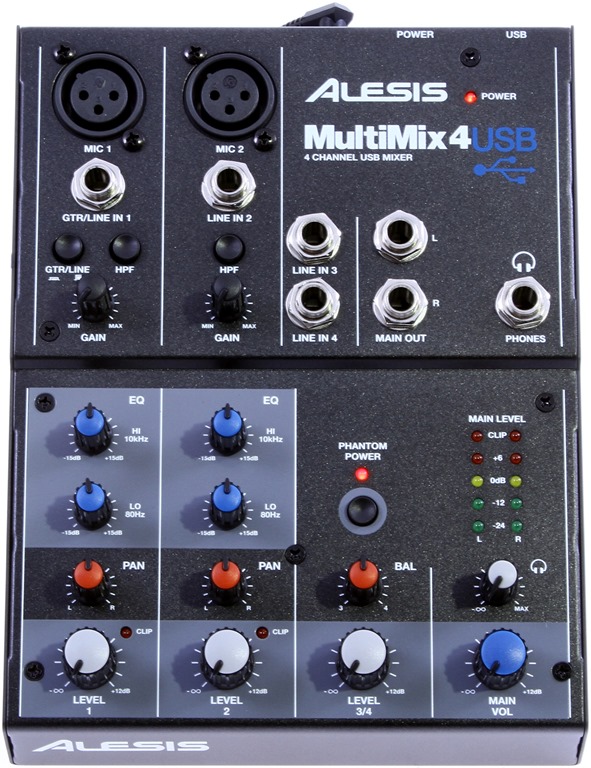
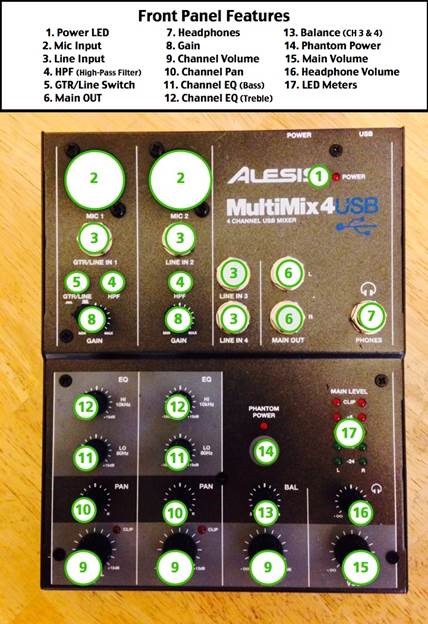
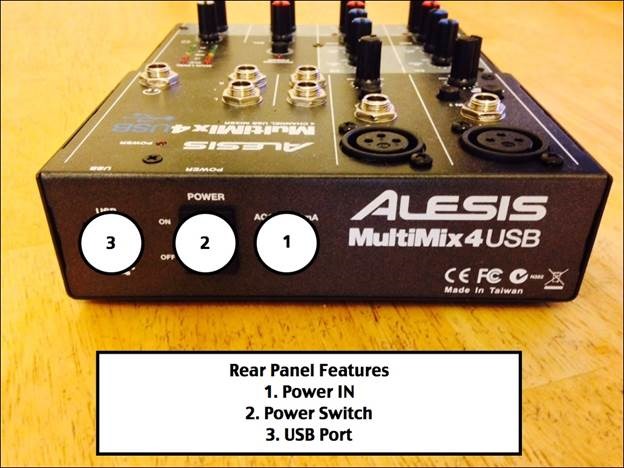
It was small, relatively simple and gave Brad hands-on control over the pieces of his podcast.
There was one issue.
Brad reported a small buzzing sound in the headphone input when using multiple headphones. He suspected it was a problem with his particular unit rather than necessarily a characteristic of every MultiMix 4.
That’s worth preserving because it’s exactly the kind of thing that makes an old hands-on review useful.
It isn’t a specification.
It’s something that actually happened.
Podcasting Hardware Changed Around the Mixer
In 2013, it was common to assemble a podcast studio from products that weren’t necessarily designed specifically for podcasting.
A mixer was a mixer.
An audio interface got sound into the computer.
Software handled calls.
Other software handled recording.
You figured out how to route everything.
You figured out how to prevent a remote guest from hearing their own audio back.
Then you figured out how to record it all.
Dedicated podcast hardware changed that equation.
Modern podcast consoles can combine microphone preamps, headphone outputs, USB audio, multitrack recording, sound pads, processing and remote-guest routing into one system.
Some modern podcast recorders even build mix-minus directly into the device, removing one of the more confusing routing jobs from older remote-recording setups.
That doesn’t make a traditional mixer useless.
It means podcasting became a big enough market that companies started building hardware specifically around podcast workflows.
My Own Mixer Path Was Different
It’s important to keep Brad’s MultiMix 4 story separate from my own equipment history.
The MultiMix 4 reviewed here was Brad’s experience.
My own Alesis story involved a MultiMix 8 USB FX.
By 2015, I had managed to spill water on it.
That sent me down another path.
I experimented with a PreSonus AudioBox USB 2×2 and VoiceMeeter, which moved more of the audio-routing work into software.
Then I ordered a Mackie PROFX8 mixer.
We talked about that on Home Gadget Geeks 215, and I documented the larger transition in my Spring 2015 Average Guy Studios Gear Update.
Those experiments reinforced something I’ve learned repeatedly while producing podcasts:
There isn’t one permanent answer to audio routing.
The equipment changes as the production changes.
Mixer vs. Audio Interface vs. Podcast Console
This is probably the most useful distinction to add to the original review for someone reading it in 2026.
Traditional Mixer
A mixer is designed primarily to combine and control multiple audio sources.
You get physical gain, level, EQ and routing controls.
For live work, that immediacy can still be extremely useful.
Audio Interface
An audio interface is primarily about getting high-quality audio into and out of a computer.
It may have microphone preamps and monitoring controls, but it doesn’t necessarily give you the same hands-on mixing environment.
My brief PreSonus/VoiceMeeter experiment was a good example of how software can take over some of the work that would otherwise happen on a physical mixer.
USB Mixer
The MultiMix 4 lived somewhere between those worlds.
It gave Brad physical mixer controls while also connecting the audio workflow to a computer over USB.
That combination was a big part of its appeal.
Dedicated Podcast Console
Podcast-specific hardware takes the idea further.
Instead of starting with a general-purpose mixer and figuring out how to make it work for podcasting, the device is designed around microphones, headphones, remote callers, sound playback, recording and streaming from the beginning.
That’s probably the biggest change since Brad wrote this review.
Where the MultiMix 4 Shows Its Age
Computer compatibility
With any older USB audio device, I’d verify current operating-system compatibility before building a new workflow around it.
A mixer can be electrically and mechanically fine while the computer side of the equation has moved on.
Remote guests
Brad used Google Hangouts as part of his podcast workflow.
Remote production is now a much bigger part of podcasting, and modern hardware and software offer far more integrated ways to handle callers and return audio.
Recording flexibility
Modern podcast systems can provide much more sophisticated multitrack recording and routing.
That can give you individual tracks for voices and other sources instead of committing everything to one finished stereo mix.
Workflow integration
The MultiMix 4 gave Brad useful physical control.
Modern equipment can combine that control with recording, processing, routing and remote-production features.
The value has shifted from simply having a mixer to having the right workflow.
Is the Alesis MultiMix 4 Still Useful in 2026?
Potentially.
If you already own one, it works properly with your computer and its inputs fit what you’re doing, there’s no rule saying you have to replace it.
Knobs don’t stop working because a newer podcast console exists.
Gain is still gain.
EQ is still EQ.
A microphone still needs to get into the computer somehow.
But I wouldn’t buy an older mixer simply because it once received a strong review.
I’d start with the workflow.
How many microphones?
How many headphones?
Are guests local or remote?
Do you need independent tracks?
Do you livestream?
Do you want sound pads?
Do you need hardware processing?
How much routing do you want to manage yourself?
Those answers should determine the hardware.
Should You Buy a Small USB Mixer for Podcasting in 2026?
For some workflows, absolutely.
A small USB mixer can still make sense when you need straightforward physical control over a few microphones or other audio sources.
But if I were building a podcast setup from scratch, I’d compare three categories before buying anything:
USB mixer
Audio interface
Dedicated podcast console
The question isn’t which category is newest.
It’s which one eliminates the most friction from the way you actually produce your show.
That’s what the MultiMix 4 did for Brad in 2013.
Current Podcast Audio Options Worth Comparing in 2026
These aren’t products from Brad’s original 2013 review, and they aren’t presented as gear I personally use. They’re current examples of the different podcast-audio paths worth comparing in 2026.
If You Want a Traditional USB Mixer
The Mackie ProFX10v3+ keeps the physical mixer approach while adding modern USB-C connectivity, loopback, Bluetooth and onboard effects that can fit recording and streaming workflows.
If You Want a Simple Audio Interface
The Focusrite Scarlett 2i2 4th Gen is a current 2-in/2-out interface example for someone who mainly needs to get a couple of microphones or other sources cleanly into a computer and let software handle more of the production workflow.
If You Want a Podcast-Specific Console
The RØDE RØDECaster Duo represents the dedicated podcast-console approach, integrating more of the recording, routing, processing and sound-playback workflow into one device.
Products and Related Gear
Alesis MultiMix 4 USB — The compact four-channel USB mixer Brad reviewed here in 2013.
Audio-Technica ATR2100 — The microphone Brad used as part of the original workflow.
Alesis MultiMix 8 USB FX — A different Alesis mixer that I later used in The Average Guy Studios.
PreSonus AudioBox USB 2×2 — The audio interface I experimented with in 2015 while testing a more software-driven routing approach.
Mackie PROFX8 — The mixer I moved to after the MultiMix 8 USB FX in my own studio.
Frequently Asked Questions
Was this Jim’s original Alesis MultiMix 4 review?
No.
The original hands-on review was written by Brad Chaffee as a guest blogger for TheAverageGuy.tv.
This 2026 update adds my editorial perspective and some context about how podcast-production hardware evolved afterward.
What problem did the MultiMix 4 solve for Brad?
It gave him better physical control over microphone gain, EQ and multiple audio sources while producing his podcast.
Brad reported that his production workflow became substantially faster and that he felt more confident about the sound he was recording.
Is a USB mixer the same as an audio interface?
Not exactly.
There is overlap, but a mixer is primarily designed around combining and controlling sources, while an audio interface focuses on getting audio into and out of a computer.
USB mixers combine aspects of both.
Is a podcast console just another mixer?
Not really.
Dedicated podcast consoles are designed around podcast-specific jobs such as multiple microphones, independent headphone feeds, recording, sound playback, remote guests and streaming.
That tighter integration is one of the biggest differences from the kind of setup Brad was building in 2013.
Do I need mix-minus for remote podcast guests?
If your routing sends a guest’s own voice back to them, you need some way to remove that return signal.
That’s what mix-minus does.
Modern podcast hardware and software can make this substantially easier than the manual routing used in many older setups.
Should I buy a used MultiMix 4 in 2026?
Only after confirming that it works with the computer and operating system you plan to use and that its input/output capabilities match your workflow.
I would not choose it solely because this old review was positive.
What matters most when choosing podcast audio hardware?
Start with the production workflow rather than the product.
Count your microphones and headphones, think about local versus remote guests, decide whether you need isolated tracks, and determine how much streaming, processing and audio routing you want the hardware to handle.
Then choose the tool.
Looking Back at the MultiMix 4
Brad’s original review captures an interesting point in podcasting history.
The tools weren’t necessarily built for podcasters yet.
So podcasters built systems out of mixers, microphones, computers, call software and a lot of creative routing.
The MultiMix 4 helped Brad solve that problem.
His biggest wins weren’t specifications.
They were better control over his microphone, better confidence in the sound and less time spent producing an episode.
Those are still excellent goals in 2026.
The difference is that we now have many more ways to get there.




Nice review. I have never used a mixer, but getting ready to get one. Does this mixer allow me to record in 4 separate tracks to the PC, or do they get mixed into just a single PC input?
It doesn’t Keith.