- Home
- About
- Donate / Deals
- Financial Tech
- Fitness Tech
- Home Tech
- Rich's RPG
- TAG Podcasts
Mushkin Chronos 120GB SSD Install and Performance Specs
I recently purchased a Mushkin Enhanced Chronos MKNSSDCR120GB 2.5" 120GB SATA III MLC Internal Solid State Drive (SSD) from Newegg. It can be found here http://www.newegg.com/Product/Product.aspx?Item=N82E16820226236
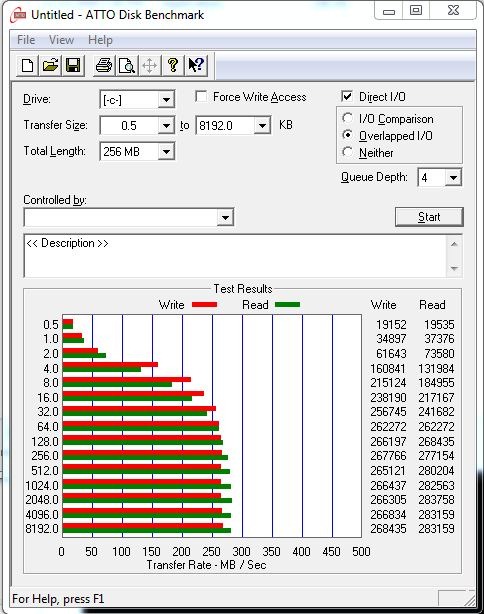
I purchased it to replace a Western Digital 1 TB WD10EACS Green Drive that will be moved into my storage pool on the Window Home Server (where it belonged in the first place). It was also a bit slow at times. See the stats below:
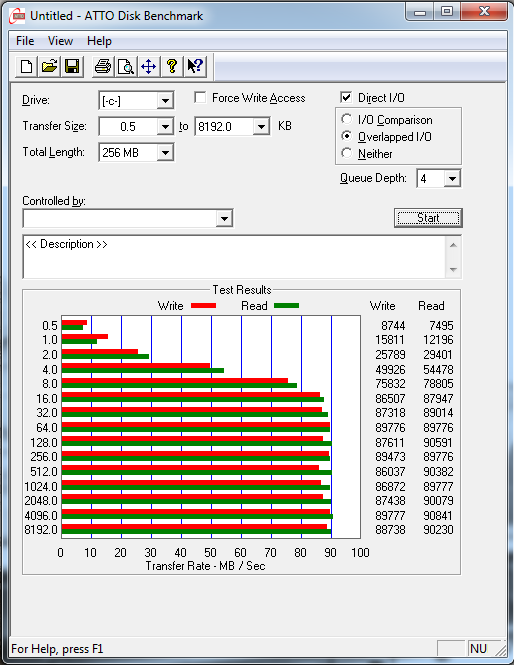
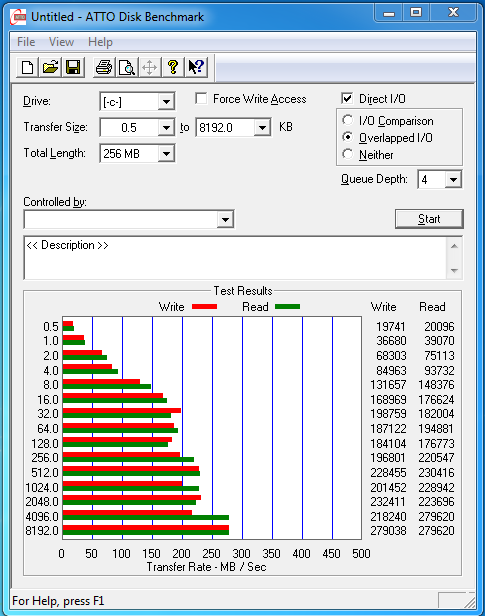
The box with the new drive arrived this week and I couldn’t wait to get it installed on the weekend. After installing Windows 7 Ultimate from scratch (very fast install), updating all the software (even faster) and installing all the regular apps, I ran another ATTO Disk Benchmark with amazing results. How did I ever live with a spinning drive? Well worth the $150 upgrade!
While this is a SATA III drive, I have it in a Motherboard (Gigabyte H55M-USB3) that only supports SATA II drives. The results may have been even better if this drive was on a board that supported a full 6Gb/s.
UPDATE January 21 2012: I added the second screen shot a week later. Looks like the drive might get even better with age! Results a week after the install were even higher. Any thoughts tech community?
| Day of Install | One Week Later |
With most of the necessary software installed, I am using about 35GB of the 111GB that are available. Not too worried about filling it up too soon and will be careful to move most of my created content to a network storage drive.

So to free up some additional space, I moved the page file off the C Drive and onto the D Drive using the Advanced / Performance / Settings / Virtual memory settings and changed the size of the file from System managed to Custom. I set the initial size to 8GB and the Maximum size to 8GB per my SSD advocate Rich O’Neil.
Rich also helped me with a change using the cmd powercfg –h off to turn off the space allocated for hibernation. Now my drive looks like this:
I’ll never go back to a non SSD OS drive. Speed is incredible! From here on out, every drive gets replaces with an SSD where speed is important.

| Print article | This entry was posted by jcollison on January 14, 2012 at 9:03 pm, and is filed under Deal-of-the-Week, Home Tech, Review, Uncategorized. Follow any responses to this post through RSS 2.0. You can leave a response or trackback from your own site. |
No comments yet.
71 Home Tech Podcast: New SSD Drives, New Cloud Storage Options, Big Microsoft Changes, Samsung Galaxy S III
about 1 week ago - No comments
Jim and Andrew are joined this week by Gary Johnson (filling in for Christian) and Special Guest Chris Lux for show 71 of The Home Tech Podcast. We chat about New SSD Drives, the newest in Cloud Storage Options (Google Drive, SkyDrive, Dropbox) as well as some big Microsoft changes with their software.
Listen to the Audio:
Audio clip: Adobe Flash Player (version 9 or above) is required to play this audio clip. Download the latest version here. You also need to have JavaScript enabled in your browser.
Or Download episode (Right click, save target as)
Listen LIVE every Thursday night at http://TheAverageGuy.tv/live @ 5pP/7pC/8pE
Watch live streaming video from theaverageguy at livestream.com
Mushkin Chronos 120GB SSD Install and Performance Specs
Mushkin Callisto 120GB SSD Install and Performance Specs
Maybe it is time you actually read that Google Drive Terms of Service
Microsoft SkyDrive vs Dropbox vs Google Drive vs Amazon Cloud Drive
If you’d like to subscribe to the show, click on
to update your iTunes library, or for other Podcast downloading applications, please click on the RSS Feed and pick your Pod Catcher of choice!
Or, you can now stream the show online at Stitcher.com at http://stitcher.com/listen.php?fid=22271
Jim’s Twitter: http://twitter.com/#!/jcollison
The Show Announcements and Schedule: https://twitter.com/#!/TheAverageGuyTV
Andrew’s Twitter: http://twitter.com/#!/unrealshots
Christian’s Twitter: http://twitter.com/#!/TheWizBM
Contact the show at podcast@theaverageguy.tv
Find us on Facebook: https://www.facebook.com/groups/theaverageguy/
Find this and other great Podcasts from the Average Guy Network at http://theaverageguy.tv
70 The Home Tech Podcast: CrashPlan, eBay, HTPC, Rainmeter, RaspberryPi, Samsung Galaxy Nexus, Samsung Galaxy Note, Windows 8
about 3 weeks ago - No comments
Jim, Andrew and Christian are joined this by Gary Johnson for show 70 of The Home Tech Podcast. We talk CrashPlan, eBay, HTPC, Rainmeter, RaspberryPi, Samsung Galaxy Nexus, Samsung Galaxy Note, Windows 8
Listen LIVE every Thursday night at http://TheAverageGuy.tv/live @ 6pP/8pC/9pE
Listen to the Audio:
Audio clip: Adobe Flash Player (version 9 or above) is required to play this audio clip. Download the latest version here. You also need to have JavaScript enabled in your browser.
Or Download episode (Right click, save target as)
or Watch the video:
Watch live streaming video from theaverageguy at livestream.com
The guys start off with an eBay Australia Group Deal on the Samsung Galaxy Nexus, the current flagship Google branded Android phone, which is the handset variant that will work on all networks in Australia, and is AT&T compatible in the US. The guys talk about carrier exclusivity for mobile phone handsets, as well as some other phones such as the Nokia Lumia, one of the new Windows Phone 8 devices, which has been promised for quite a while, yet still to hit the market.
Andrew talks about a new small form factor PC, the Zotac ZBox Nano XS he has his eye on for building a new Home Theatre PC. The PC runs an AMD E-450 processor, and comes with 2GB of DDR3 memory, a 64GB SSD, Gigabit network and Wireless N, Remote Control, will fit on the back of a TV on a standard VESA mount, and is fully compatible with Windows 7.
Christian’s Deal of the Week is Micro SDHC Memory Cards over at GearXS.com, via a WOOT deal, with cards being as low as 0.99 for 4GB!
Christian also shares some of his recent engadget reading, as they cover the release name of Windows Server 8, as well as the names of the various flavors of Windows 8. Hit the links below for the news!
- http://www.engadget.com/2012/04/18/windows-server-2012/
- http://www.engadget.com/2012/04/16/microsoft-outs-three-flavors-of-windows-8-windows-8-windows-8/
- http://www.engadget.com/2012/04/16/raspberry-pi-begins-shipping/
- http://www.engadget.com/2012/04/16/microsoft-job-ads-hint-at-skype-for-browsers/
The guys talk some more about the Raspberry Pi ARM-based computer, discussion why the Raspberry Pi has been bought to market, and the intended audience for the machine.
Gary talks about his adventures with Rainmeter, the desktop customization tool that he and Christian have been using to customize their Windows user experiences. The image below is Christians’ desktop, customized with Rainmeter.
Gary talks about some issues he has been experiencing with Windows Media Center, and the guys talk some more about desktop management. Andrew uses Stardock Fences to manage his desktop space
Gary and the guys discuss their experiences so far with Windows 8, and where they believe Windows 8 is headed, as well as the success they believe it will have once released to market.
Gary talks about the Samsung Galaxy Note and its impending release onto the Sprint network, once the CDMA version of the hardware is released.
Gary also gives us an update on recent updates to Subsonic, and some of the issues that are being seen with the Android client for the current release.
Jim and Gary talk about the performance increases in moving a system drive to an SSD drive, before talking about private cloud backups using Crashplan, and how Jim provides a data backup service to his family without using a third party cloud storage provider.
If you’d like to subscribe to the show, click on
to update your iTunes library, or for other Podcast downloading applications, please click on the RSS Feed and pick your Pod Catcher of choice!
Or, you can now stream the show online at Stitcher.com at http://stitcher.com/listen.php?fid=22271
Jim’s Twitter: http://twitter.com/#!/jcollison
The Show Announcements and Schedule: https://twitter.com/#!/TheAverageGuyTV
Andrew’s Twitter: http://twitter.com/#!/unrealshots
Christian’s Twitter: http://twitter.com/#!/TheWizBM
Contact the show at podcast@theaverageguy.tv
Find us on Facebook: https://www.facebook.com/groups/theaverageguy/
Find this and other great Podcasts from the Average Guy Network at http://theaverageguy.tv
Mushkin Callisto 120GB SSD Install and Performance Specs
about 3 months ago - No comments
So last weekend I put and Mushkin Enhanced Chronos (MKNSSDCR120GB) 120GB SSD ($150) in my personal PC here at home and saw some amazing results. I posted about it here. Later that weekend, I was talking to the Worship Guy at our church and he had seen the post as ask if I thought an SSD drive could speed up the PC the church uses for video production. It is a Dell XPS 630i with (Core 2 Duo Quad Core, E8200, 2.66, 6MB Wolfdale, 65W) but came into our hands with a 500GB OS spinning drive and just 3GB of RAM. Of course my answer was YES and how fast can we get one in! He smiled.
Later the next day a Mushkin Callisto 120GB SATA II 2.5” drive was ordered from Newegg.com and shipped with 8GB of new RAM ($100). Since the PC does a lot of video rendering, more RAM is always better.
The upgrade was smooth and easy. Added the RAM (G.Skill DDR2-800 4x4GB) first and turned the PC back on to make sure it was working correctly. Checked the Windows Experience Index (Control Panel\System and Security\System) and noticed that the Memory number had changed from a 5.9 to a 7.1. A good sign that all was working well.
I then pulled the SSD from the box and mounted it to the included 3.5” tray. It was an easy mount into the plastic hard drive mounting brackets and slid it back into the machine. Attached the power and SATA cable plugged the machine back in.
I had burned Windows 7 Home Premium x64 to a DVD earlier and used that to reinstall the OS. It took 7 minutes from beginning to end. Another good sign! Usually install time on a normal spinning drive can be 30 minutes or more.
After the PC rebooted a couple times, I started in on the Windows Updates as well as some of the normal software that I install on every PC I work on. A few of the titles are Microsoft Security Essentials, Malwarebytes, Window Live Essentials and such.
Below are some of the dramatic improvements that were made with this $250 upgrade:
| Before |
| After |
Looking at the results, we see that the scores for both the RAM and the Primary Hard disk went up significantly. Both those items had been the bottleneck. RAMs score moved from 5.9 to 7.2 and the Primary hard disk moved from 5.9 to a best score of 7.4! The processor score also jumped up .1 from 7.1 to 7.2. Now the Graphics Card is the bottleneck at 6.8.
Bellow is difference between the spinning 500GB HD and the Solid State 120GB HD. You can really see the difference in performance.
| Before with Spinning Drive | After with SSD |
#59 The Home Tech Podcast: SSD Upgrades, Google Hangouts vs Skype, Yahoo! and the Internet Blackout of 2012
about 3 months ago - No comments
Audio clip: Adobe Flash Player (version 9 or above) is required to play this audio clip. Download the latest version here. You also need to have JavaScript enabled in your browser.
Or Download episode (Right click, save target as)
Listen LIVE every Thursday night at http://TheAverageGuy.tv/live @ 5pP/7pC/8pE
This week Jim and Andrew bring you the latest installment of the Home Tech Podcast.
Jim talks about this recent upgrade to a 120GB Mushkin SSD drive in his primary PC, and the performance increases he has seen as a result of the upgrade, as well as how he moved non-critical services from the SSD to a traditional rotating drive. Check out Jim’s post on the experience, and the benchmark comparison between the old rotating drive and the new SSD. The guys talk about SSD’s in general, and the performance benefits of the upgrade, as well as a similar upgrade he is performing this weekend on an older machine that is used at the family church for their media production.
The guys move on to talk abut the benefits of using the Google Plus Hangouts feature for recording the podcast, rather than using Skype, with Hangouts offering features such as group chat, and group screen sharing within the standard product – a priced upgrade with Skype. Although not yet for the masses, the guys predict that Hangouts is a feature to watched closely!
The guys move on to talk about the recent Internet blackout, with PIPA and SOPA being the most commonly spoken acronyms relating to this, being the Protect IP Act and Stop Online Piracy Act, both with the intent of protecting Intellectual Property and Piracy online. The guys talk extensively about their views on both Acts in general, and their take on both, as well as the power of people as opposed to the power of individuals.
The guys talk briefly about the headsets they use for recording the podcast. Andrew switches between a Logitech ClearChat headset and a Plantronics B230-M Voyager Pro UC headset, whereas Jim uses Yurbuds for earpieces, and a Yeti Blue Microphone.
The guys talk about the resignation of Jerry Yang from Yahoo! and what they think this may mean to the search engine industry, and the future of search on Internet. The guys don’t believe this will have a huge impact on the search engine business, and as regular listener Renny says in the Livestream chat, “Yahoo is the Kodak of Internet search”
The guys go on to talk about the earnings announcements from Microsoft ($20 million USD for the most recent quarter), and compare the product strategies we see coming from Microsoft and Apple, and how this may impact on the revenue of both companies.
The guys close out with a wrap of the show, and some talk about the legislations being introduced into both the US and Australian societies, and speculate if PIPA and SOPA have the potential to be the “New Prohibition”, and if both Acts will have the same level of success.
Thanks for listening to the podcast, and if you have time, please join us in the live chat while we record the show!!
Jim’s Twitter: http://twitter.com/#!/jcollison
Andrew’s Twitter: http://twitter.com/#!/unrealshots
Christian’s Twitter: http://twitter.com/#!/TheWizBM
Contact the show at podcast@theaverageguy.tv
Find us on Facebook: https://www.facebook.com/groups/theaverageguy/
Find this and other great Podcasts from the Average Guy Network at http://theaverageguy.tv
#2 Rich’s Random Podcast Generator: RAID, UnRAID, Wuala, HTPC’s and Streaming Media
about 9 months ago - No comments
Listen now:
Audio clip: Adobe Flash Player (version 9 or above) is required to play this audio clip. Download the latest version here. You also need to have JavaScript enabled in your browser.
Download episode right-click > Save target/link as…
From the Guys who brought you the Home Tech Podcast, and a production of the Average Guy Network, Rich’s RPG is a weekly show about the world of technology hosted by Jim Collison and Rich O’Neil. Using Google+ hangout to meet up with technology guys and gals, they discuss whatever is hot, current or frustrating them at the moment. No outlines, no agenda, no worries.
This week, Rich and Jim are joined once again by Mike Howard ofjpeg2RAW fame. Rich and Mike talk about general RAID configurations, settings and hardware that they use with their respective home servers. Rich, new to RAID, is using a HighPoint RocketRAID 2720 in his Windows Home Server 2011 machine, while Mike uses a SuperMicro SATA card in his UnRAID server. What is UnRAID, you ask? From the Lime Tech web site:
“unRAID Server is an embedded Network Attached Storage server Operating System designed to boot from a USB Flash device and specifically designed for digital media storage.”
Basically, UnRAID does not stripe the parity of an array across all drives as a RAID5 does, but rather assigns one fixed drive as the parity drive. It also does not stripe data across the drives as RAID5 does, but rather writes files in their entirety to a single drive which is NTFS formatted and easily readable on any system. The down side of UnRAID is that the performance (the writes, anyway) is lower than a single drive’s. This is because parity calculations are being done at the same time. Overall, though, UnRAID is a pretty robust storage solution.
Ever thought about backing up to the cloud but hesitate because of the cost of online storage? Jim and Mike talk about using Wuala to create a free backup network using your friends’ PC’s.
If you’ve ever been watching Netflix and had Windows updates break in on the movie, you understand that an HTPC and Windows Updates do not mix. Rich tries to convince Jim to shut off Windows Updates, along with other app updates such as Flash. If you don’t use your HTPC to browse the Internet, and most people, Rich suggests managing updates manually or skipping them altogether. This’ll put an end to annoying interruptions and increase WAF.
In the show this week: Mike Howard, Jim Collison, RIch O’Neil
Jim’s Twitter: http://twitter.com/#!/jcollison
Contact the show at podcast@theaverageguy.tv
If you have a product or a topic you would like us to discuss, please tag your articles in Delicious using the tag “TheAverageGuy”.
Find this and other great Podcasts from the Average Guy Network at http://theaverageguy.tv
Intro and Exit Music used by permission from “"In the Shadow Of The Great Machine” by Fool’s Chaos. Hear more great tunes at Fool’s Chaos
TAG Tech Deal of the Week–Seagate Momentus XT 500GB Hybrid 2.5” Hard Disk
about 9 months ago - No comments
This weeks’ Deal of the Week, is the Seagate Momentus XT 500GB 7200 RPM 2.5” Hybrid drive from NewEgg.com, a worthwhile upgrade at $89.99. The drive is larger than an SSD, with improved performance over a regular drive.
#37 The Home Tech Podcast: Rich’s Random Podcast Generator Beta
about 9 months ago - No comments
Warning: Long Show Ahead!
One weekend, Rich O’Neil (and some of tech guys that hang around the Home Server Show Podcast) thought, “what would happen if we just recorded some of the conversations we have around our tech stuff?” The result was this podcast that we recorded on July 31st. Rich’s Random Podcast Generator was born! Interested in your feedback.
We used Google+ Hangout to record the conversation. If this project is successful, we will try it again on it’s very own RSS feed!
We chatted about SSD Drives, RAID, UNRAID, problems with Apple, Android and Windows Phone 7 and much, much more.
Here are some links for the show:
http://www.futureshop.ca/EN-CA/product/id/10160313.aspx
http://www.newegg.com/Product/Product.aspx?Item=N82E16836431024&Tpk=yeti%20blue
http://compare.ebay.com/like/280714779827?var=lv<yp=AllFixedPriceItemTypes&var=sbar&_lwgsi=y
http://www.tomshardware.com/reviews/ssd-reliability-failure-rate,2923.html
http://www.newegg.com/Product/Product.aspx?Item=N82E16820231378
http://www.newegg.com/Product/Product.aspx?Item=N82E16820148362
http://www.newegg.com/Product/Product.aspx?Item=N82E16820226206
http://www.newegg.com/Product/Product.aspx?Item=N82E16820227542
http://wpblog.perfectdisk.com/?p=1415
http://www.raxco.com/support/kb/788/
Thanks to those who joined us on the podcast – John Zajdler, Bill Paulmenn, Mike Howard and Mike Faucher
Listen:
Audio clip: Adobe Flash Player (version 9 or above) is required to play this audio clip. Download the latest version here. You also need to have JavaScript enabled in your browser.
Or Download episode (Right click, save target as)
Jim’s Twitter: http://twitter.com/#!/jcollison
Contact the show at podcast@theaverageguy.tv
If you have a product or a topic you would like us to discuss, please tag your articles in Delicious using the tag “TheAverageGuy”.
Find this and other great Podcasts from the Average Guy Network at http://theaverageguy.tv